Turnout rails
A turnout is a special rail with more than two ports and several internal paths. At any time, only one of its paths is active: that’s where the locomotive will go.
Anatomy
A typical turnout has three ports: a toe and two heels (such as “straight” and “diverging”). It exposes two paths:
- Toe → Straight (straight through),
- Toe → Diverging (diverging route).
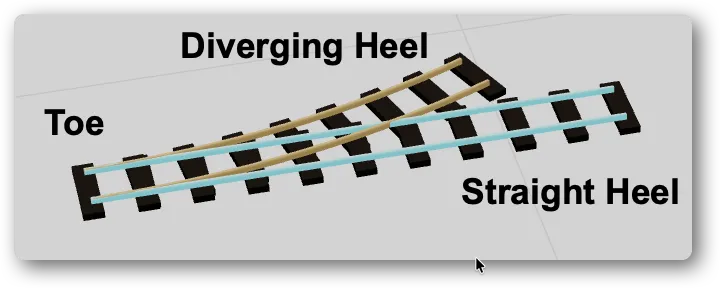
Double slip switches or other types expose more.
The active path
The rail holds its current active path. All routing and simulation functions rely on it: a train arriving from the point exits through the picked port.
Changing a turnout’s state
Three ways, depending on the mode:
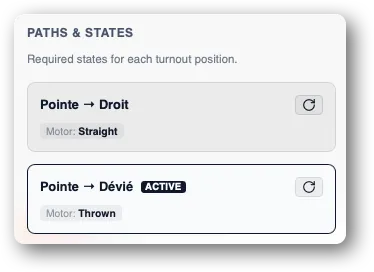
- In Manual mode, click directly on the turnout in the canvas to cycle to the next path. You can also do it from its card in the Paths & States sidebar section.
- In Auto mode, the supervisor positions each turnout automatically before a train crosses it.
- In Edit mode, the Paths & States section allows you to set the state, mainly to test the actuator configuration.
Turnout and actuator
For a turnout to be driven by the command station, you must associate an actuator with it (a hardware device on a DCC address). The actuator is what physically materialises the active-path change.
See Configuring an actuator (coming soon).
If you don’t attach an actuator, the turnout stays purely logical: it works in simulation and edit, but no order is sent to the station to control the real equipment.