How to automate staging yard routing? The TrainPanel example
If you are building a model railroad, you will quickly face a major challenge: how to manage traffic realistically without all your trains constantly running in circles on the visible part of the layout? This is where staging yards (or hidden yards) come into play.
However, storing trains out of sight introduces another challenge: automation. How can you be sure a locomotive won’t crash into another one in a dark, hidden area?
In this article, we will dissect a practical case study of automatic management and routing using TrainPanel software, using a system based on blocks.
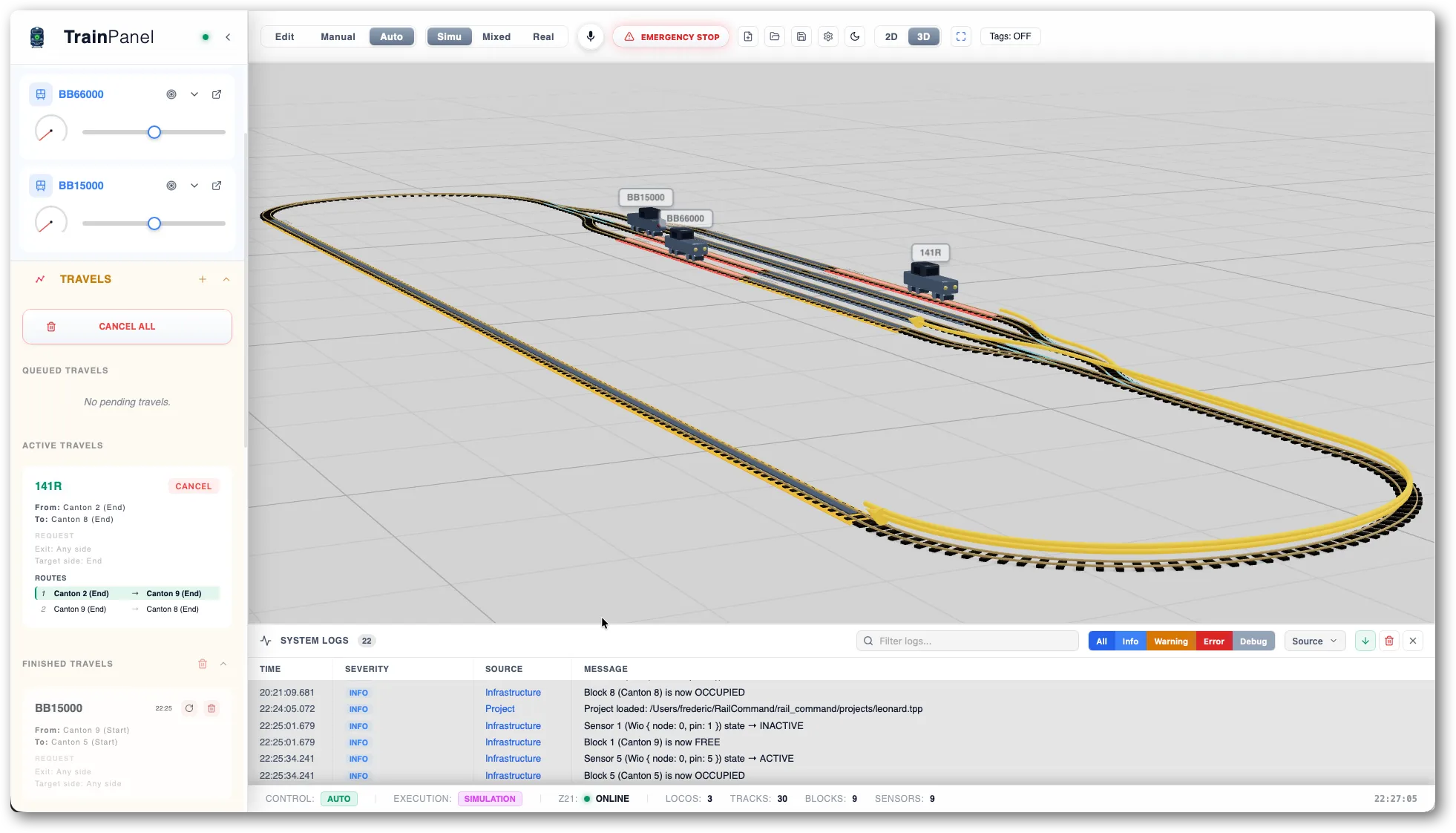
The practical case in video: 3 locomotives and 8 blocks
To illustrate the power of automation with TrainPanel, watch this real-world demonstration:
The model railroad layout configuration
To help you understand the video, here is how this digital layout is structured:
- The staging yard: A hidden yard containing 8 blocks to store and prepare our train sets.
- The visible scene: The scenery part of the layout, which only features one strategic block in this case, block 9.
- The rolling stock: 3 DCC-decoder-equipped locomotives, managed simultaneously.
- The technology: Feedback (occupancy detection) is provided by current sensing feedback modules, allowing the software to know exactly where each train is. In this case, a Roco 10819 module combined with a z21 command station is used.
Understanding the interlocking and routing logic
In the video, we trigger a shunting scenario that highlights the management software’s built-in intelligence:
1. The route request and blocking
We request a steam locomotive (the 141R) to change blocks within the staging yard itself. However, the physical track layout forces it to perform a shunting move (a U-turn) via block 9, located on the visible scene.
The problem? Another locomotive (the BB15000) is already occupying block 9. The software calculates the route and immediately detects the conflict.
2. Queue management
This is where automation truly shines. Instead of causing a crash or freezing the layout, TrainPanel places the 141R’s request in a queue. In the bottom left, under the route requests section, the software clearly displays the status “Pending” and specifies the reason for the blockage (target block occupied).
3. Block clearance and automatic resumption
As soon as the operator commands the BB15000 to leave the scene and return to the staging yard, block 9 becomes free.
TrainPanel’s analysis is instant:
- Block 9 is cleared.
- The software validates the pending route for the 141R.
- Turnouts are set to route from block 2 to block 9.
- The 141R starts automatically, making its entry onto the visible scene.
- Once it arrives at block 9, it performs its U-turn. The software resets the turnouts to route to block 8.
- The 141R returns to its designated storage location in the staging yard, block 8.
Why use software like TrainPanel for your staging yard?
The main benefit of using layout control software is operation safety. By dividing your staging yard into clearly defined blocks, you give the software the “eyes” it needs to enforce strict interlocking rules. Routing becomes dynamic, smooth, and completely secure.
Whether you run a small hidden siding or a large model railroad staging complex, automating hidden zones takes away the stress of collisions so you can focus on the fun of operating and detailing!
And you, how do you handle routing in your staging yards? Do you use block detection? Let us know in the comments!